A comprehensive guide to the eLearning design and development process. By Martin Bowen, Managing Director, LearnStudios

eLearning has evolved rapidly since the term was first used in October 1999 at a ‘Computer Based Training’ seminar in Los Angeles. The promise of ‘always accessible’ online education that can be delivered without the cost and logistical challenges of live face-to-face learning, has spawned a thriving new industry that has attracted substantial investment in technologies, processes and practices to support the design, development and delivery of eLearning experiences. But how should these technologies, processes and practices be best used to deliver high-quality eLearning courses?
How do we measure eLearning development success?
The proliferation and rapid evolution of technologies, systems, processes, and Learning Management Systems (LMS) demand that any ‘best practice’ approach starts with and maintains a relentless focus on the learner and the learning objective.
In short, stay focussed on the learner!
The success of any course or training program must ultimately be measured against the extent to which learning objectives were met, and the cost associated with meeting that objective. A preoccupation with adopting the latest eLearning technology or trend does not always equal success, and runs the risk of driving up the cost of development or distracting the development team from the fundamental learning needs of the audience.
The steps
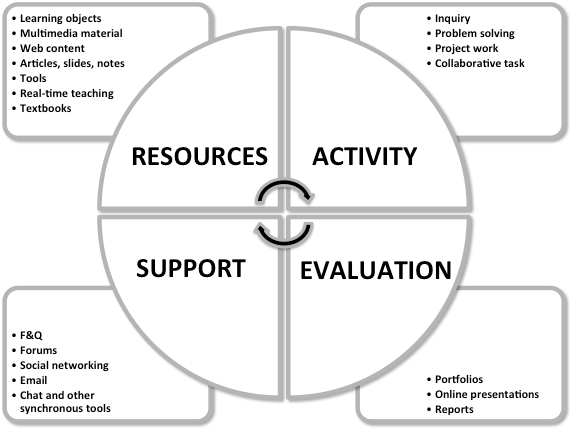
The widely adopted RASE (Resources/Activity/Support/Evaluation)student-centred learning design model (Churchill, King, & Fox, 2013) provides a useful framework when it comes to designing and developing eLearning courses. Systematically using the following steps as a best practice checklist will ensure that the learner remains the focus throughout the development phrase.
- Define the learning objective
- Understand the audience
- Establish the learning messages
- Identify the resources & activities
- Identify the evaluation methods
- Storyboard
- Content review and approval
- eLearning Development: Authoring and Production
- Testing
- Deployment & Feedback
Figure 1 below illustrates the structure of the RASE model:
Figure 1. The RACE Model
Define the learning objective
Depending on the context, the learning objective/s may arise from a business need, or a gap in knowledge. A needs analysis is highly recommended as a methodology to facilitate determination of the learning objective, but also to build stakeholder buy-in and engagement in the eLearning development project. Regardless of the context or its genesis, the process must start with a clear articulation of the learning objective/s. It may be that there are multiple learning objectives, and these should all be defined, documented and endorsed by all relevant stakeholders.
Particularly in corporate settings, branding considerations should also be identified and highlighted at this early stage. While brand or organisational reputation requirements may not be an explicit learning objective, they are very likely to inform the eLearning development process and set the expectations for the instructional design process to come.
Understand the audience
In corporate or educational institutions, the audience may be well established, but it is nonetheless important to consider the needs of the target audience. Ask critical questions of your audience such as:
- What level of prior knowledge do they possess?
- What access to technology, devices, internet do they have, and what is their likely level of IT literacy?
- How much time do they have to complete the training course?
- Are learner disabilities to be accounted for? Do web accessibility standards such as WCAG 2.0 standards (Web Content Accessibility Guidelines) need to be met?
- What are the audience expectations with regard to learning activities that might be undertaken during the eLearning course?
- For large, diverse target audiences, consider the diversity of need and knowledge across the audience. Are multiple training modules needed to meet different needs? Is adaptive learning necessary and appropriate?
Establish the Learning Messages
With the learning objectives already established, define and document the key and supporting learning messages.
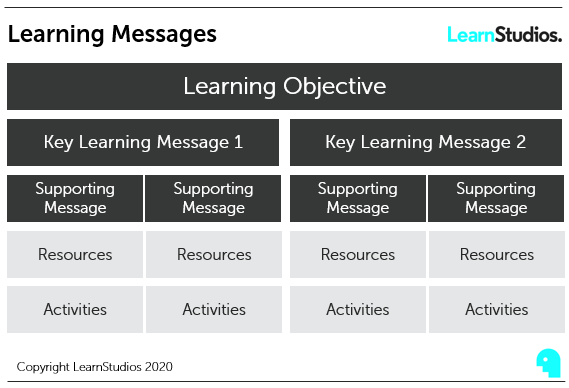
A key learning message will generally be a brief statement or description of the learning insight to be conveyed. It will set the framework of content for a whole learning module or course section, if not the whole course. It is important to clearly distinguish between the key learning message and the learning objective The key learning message is the means to achieving the learning objective.
Supporting Messages, as the name suggests, support engagement, understanding and learning in order to achieve thorough communication and adoption of the key learning message. A supporting message will typically set the framework for content on a single slide or content item.
Identify resources and activities
Each supporting message should have corresponding resources and activities to be undertaken by the learner in order to facilitate engagement, understanding and adoption. Defining these supporting resources should be identified and documented.
Resources in an eLearning context might include:
- Supporting articles
- Third party videos
- Animations
- Games
- Practical real-world examples
- Past experience anecdotes
- Any additional tools the student might need to facilitate learning such as calculators etc.
Activities are a vital element of any learning process, including eLearning courses. Providing learners opportunities to interact and engage with content is critical to achieving learning outcomes.
It’s important to keep the learning objective at front of mind when defining and collating resources and activities. As shown in Fig. 2, resources and activities sit under the umbrella of the learning objective, and learning and supporting messages. When course planning, avoid activities for activities sake and ensure that they remain inexorably linked to the overarching objective.
Figure 2. Learning Messages
In developing resources and activities, the types of content used should be given careful consideration and selected to promote engagement and recall for the student.
Click here to learn more about a range of eLearning activities
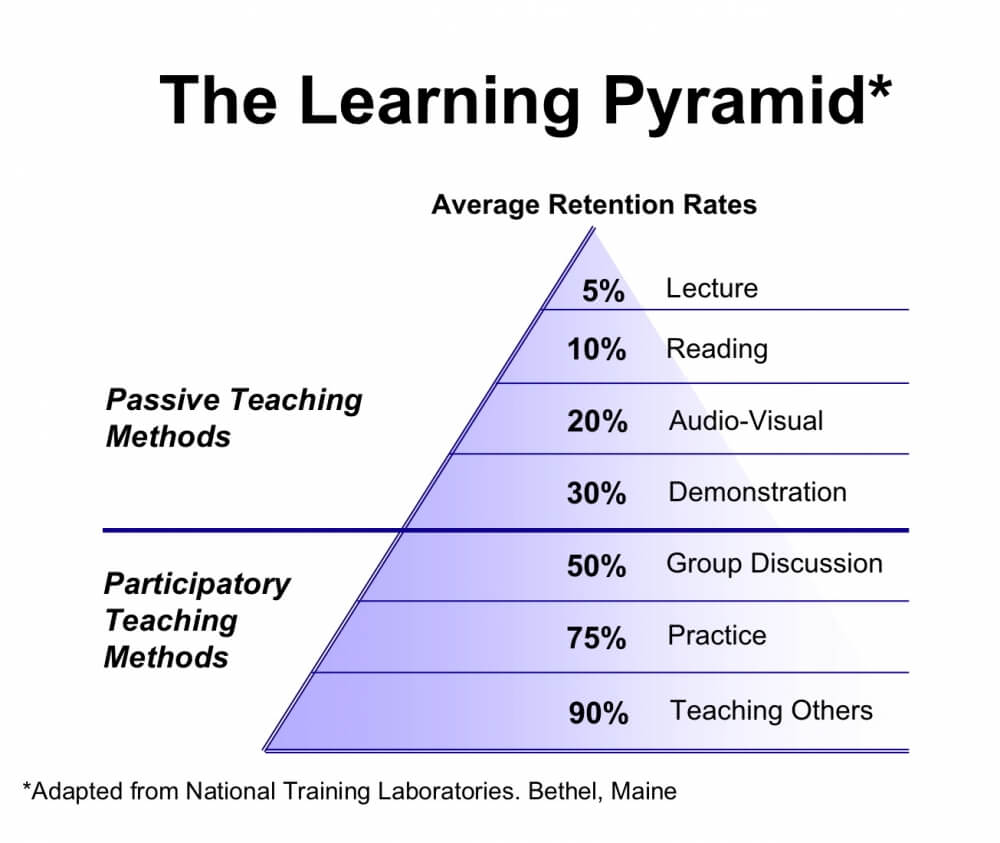
When selecting activities and types of content, consider applying a conceptual framework such as the ‘Learning Pyramid’ (researched and developed by the National Training Laboratories Institute, Maine, USA) The pyramid illustrates typical retention or recall rates that are associated with different types of learning content. Passive methods such as lectures or reading are generally associated with lower recall rates compared to active methods requiring engagement by the learner.
It’s also important to take different learning styles into account. The VARK learning model examines individual learning preferences, and suggests that the majority of learners tend to lean towards particular modalities: visual, aural, reading/writing and kinaesthetic. In light of the diversity of preferences across a learner audience, the use of a diverse range of communication methods, activities and resources will improve learning outcomes.
Insights gained from models such as the Learning Pyramid and VARK, highlight that, subject to cost considerations, every opportunity to promote engagement and interaction should be pursued in order to maximise learning outcomes.
Figure 3. The Learning Pyramid
Evaluation
Effective student-centred learning must include appropriate evaluation components, enabling students to assess their learning growth as a result of undertaking the course, and to assist course owners to identify opportunities to improve.
Remember that when we measure the success of a course we assess ‘the extent to which the learning objective is met.’ Any form of evaluation, either by the student or course provider, must take into account key outcomes.
eLearning presents a diverse range of assessment tools to deliver evaluations in an engaging and informative way.
Evaluation methods in an eLearning context might include:
- Testing
- Task-based simulations
- Scenario-based testing
- Online collaboration projects
- Open-ended questions
- Online surveys
- Interviews
Story boarding
Now it’s time for the learning messages, resources, activities and evaluation elements (collectively referred to as ‘Learning Content’) to be organised into a flow or sequence using storyboarding.
Storyboarding is a powerful process and offers two vitally important benefits to the process:
- It forces the course designer to visualise and conceptualise how the Learning Content will be laid out and presented. It highlights potential problems in the placement and presentation of activities and resources, and also illustrates gaps in the content where it may be necessary to supplement a learning message with additional resources or activities.2. It provides a very useful platform to communicate with stakeholders or clients about the content and layout of the course without going to the expense of actually building a course prototype.
The presentation of a storyboard will vary depending on the nature of the course, but will generally consist of a series of slides or pages that illustrate the placement of the Learning Content. It is highly recommended that text and image elements, including any video or voice over scripts to be included with the course, be prepared during the storyboarding process. The storyboard needs to illustrate how the audio and visual content are consistent with the on-screen content. There are a number of technologies available to support storyboarding, but for most courses, a simple presentation editor such as PowerPoint is quite suitable.
Content Review and Approval
Where clients or stakeholders are involved, it is vital to obtain buy-in, acceptance and approval for the content at this point in the process. That is, prior to the course authoring stage, which can be more complex and expensive to edit and change after development.
Questions that can be posed to facilitate stakeholder engagement in the review process might include:
- To what extent does the storyboard and content meet your expectations?
- Are there any obvious gaps in the content?
- What problems or areas of confusion do you see arising?
- How could the planned content be improved?
In general, the more attention and care that is put into the storyboarding process, the faster and more cost-effective the authoring and production process will be.
eLearning Development: Authoring & Production
eLearning courses can be presented in a number of ways using a range of different technologies and user interfaces.
In order to support the interactive elements of a high-quality eLearning experience, an authoring platform should support the creation of interactive learning activities, as well as audio, video and other rich media, and support compliance with applicable development standards and protocols such as SCORM and Tin Can API.
There are a number of authoring platforms offering different levels of functionality and cost. The most widely used platforms include Articulate Storyline, Adobe Captivate and Lectora. These platforms do require specialist skills or experience to construct the course and trigger interactive elements efficiently.
SCORM
Regardless of the authoring technologies and LMS, eLearning courses should be designed and developed in accordance with a SCORM standard. SCORM stands for ‘Sharable Content Object Reference Model’, and its purpose is to guide the creation of online training content that can be shared across systems. Importantly, SCORM allows for the tracking of users that complete a course and any test results.
Most widely used authoring platforms will incorporate SCORM compliance as a standard function.
Tin Can API
Also known as Experience API or xAPI, Tin Can API is a software interface that, when applied, creates enhanced communication capability between the eLearning course and the LMS.
Tin Can API enables detailed tracking and reporting on the behaviour and interactions a student makes with a course, and can therefore provide useful insights in relation to evaluating the outcomes of a learning experience. Tin Can API also addresses some of the limitations of SCORM, particularly in relation to viewing courses on a browser or platform removed from the LMS. In short, Tin Can API provides for much greater flexibility in the reporting and evaluation of learner behaviour.
Production
Production refers to the development of media resources and activities such as video, animation, and voice-over audio, amongst others. As the cost to produce media resources can vary dramatically, the approach to the production effort should again consider the cost benefit in line with the learning objectives and ultimate justification for the course.
For example, a talking head video, in which a presenter conveys elements of the learning messages, will generally involve:
- Writing a script (preparation of Learning Content and storyboards)
- Selecting a talent or presenter
- Engaging a video producer to shoot and edit the video (subject to cost)
Consideration should be given to the duration of rich media elements, both in terms the potential for users to lose interest, but also in terms of the load time/file size implications for the learning module.
Testing
While there are differences between eLearning products and software applications, the best practices applied to software testing provide a useful framework for testing of eLearning courses.
Types of eLearning tests (with equivalent software testing) include ):
- Slide tests (Unit Tests)
- Section test (Integration tests)
- Course test (Functional/end to end tests)
- User acceptance testing (UAT)
Slide Tests
A slide test is a test of the appearance and functionality of a single slide relative to expectations (established during storyboarding). A slide test will typically check that visual components display as expected, triggers function as intended and with appropriate timing, audio levels are correct, and that video elements function as expected. Slide tests should be performed by the same instructional designers that constructed the course, meaning that they are typically performed in the development or authoring environment rather than the published environment. All well-established eLearning authoring technologies provide for slide previews or tests.
Section tests
As the name suggests, a section test focuses on a section of a course. The purpose is to check how each slide within the section flows and that the learning messages underpinning it are delivered as expected. Section tests are also supported by most well established eLearning authoring applications, and are typically performed within the authoring environment.
Course Test
A course test runs over the entire course, module or unit in the published environment. Where a course is to be published on the web or on a web-based LMS, it should also include cross-browser testing to ensure that the course functions as required on different platforms (e.g. Chrome, Safari, Internet Explorer and Firefox).
Acceptance Testing
Acceptance Testing is much like a course test in that it covers the functionality of the whole course. However, the purpose is for the end user (typically the client) to review the course as a whole and provide feedback with a view to ultimately approving the course for publication.
Deployment and Feedback
Once the course is approved for publishing it should be deployed in accordance with a roll-out plan that is agreed with the course owner and / or stakeholders. There are a number of publishing and distribution methods that can be used, and the appropriate method should be determined by the context, learning objective and audience. The main options are web-based publishing or publishing through a LMS.
A willingness to receive and act on feedback to enhance an eLearning course is a key component of any successful eLearning product. It is always a good idea to have a pilot group that can review and provide feedback that can be incorporated into the course before the wider roll-out of the course.
________________________________________________________________________________
The RASE Learning Model
To learn more about the RASE Learning Model watch the video below.